


Why Use TradingView Alongside NinjaTrader 8?
NinjaTrader 8 excels at order execution and position management. TradingView excels at charting, market structure visualization, and multi-timeframe analysis.
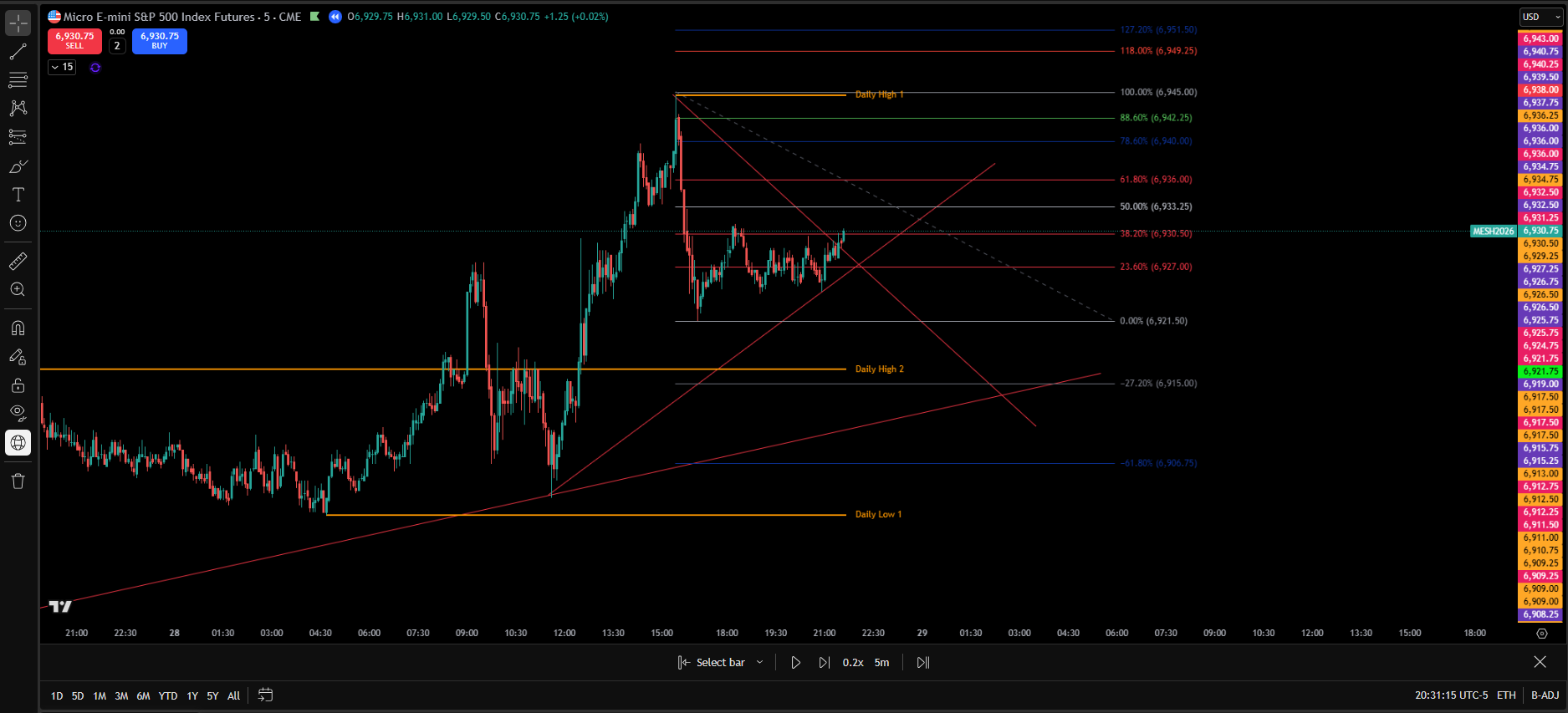
Serious futures traders often separate analysis from execution. This reduces emotional trading and improves structured decision-making before capital is deployed.
- Map higher timeframe support and resistance levels
- Track session ranges
- Analyze volatility expansion
- Backtest trading strategy concepts
- Build execution plans before entering NinjaTrader 8
Once structure is defined, execution moves to NinjaTrader — where orders are routed with precision. Risk is then enforced mechanically through AutoClose Pro Guardian, which protects your equity curve, enforces daily loss limits, and prevents overtrading.
Why TradingView Complements NinjaTrader
NinjaTrader 8 is built for order execution, strategy deployment, and direct futures connectivity. TradingView is built for advanced charting, structural visualization, and multi-timeframe context.
Serious traders often separate analysis from execution. This reduces emotional interference and improves structured decision-making.
- TradingView for structure, bias, and liquidity mapping
- NinjaTrader for precise order routing and position management
- AutoClose Pro Guardian for account-level risk management
This three-layer workflow creates clarity before execution and discipline after execution.
If you are not using TradingView for structured planning, you can access the platform here:
Multi-Timeframe Structure Planning
Before capital is at risk, professional futures traders define context. Execution is only a small part of the trading process. Structure planning protects long-term capital preservation.
Using TradingView, traders commonly define:
- Daily and weekly range context
- 4H and 1H structural levels
- Liquidity pools and imbalance zones
- Session bias and volatility expansion potential
- High-probability execution areas
TradingView’s visual clarity makes it easier to separate:
- Noise from structure
- Impulse from consolidation
- Trend from range
Once structure is defined, execution moves to NinjaTrader — where orders are placed and positions are managed. Risk is enforced automatically using AutoClose Pro Guardian, which monitors realized PnL, protects account drawdown protection, and enforces mechanical enforcement.
Risk is then enforced automatically using AutoClose Pro Guardian, ensuring daily loss limits and profit protection are maintained.
Structured Trading Workflow
 →
→
→
→
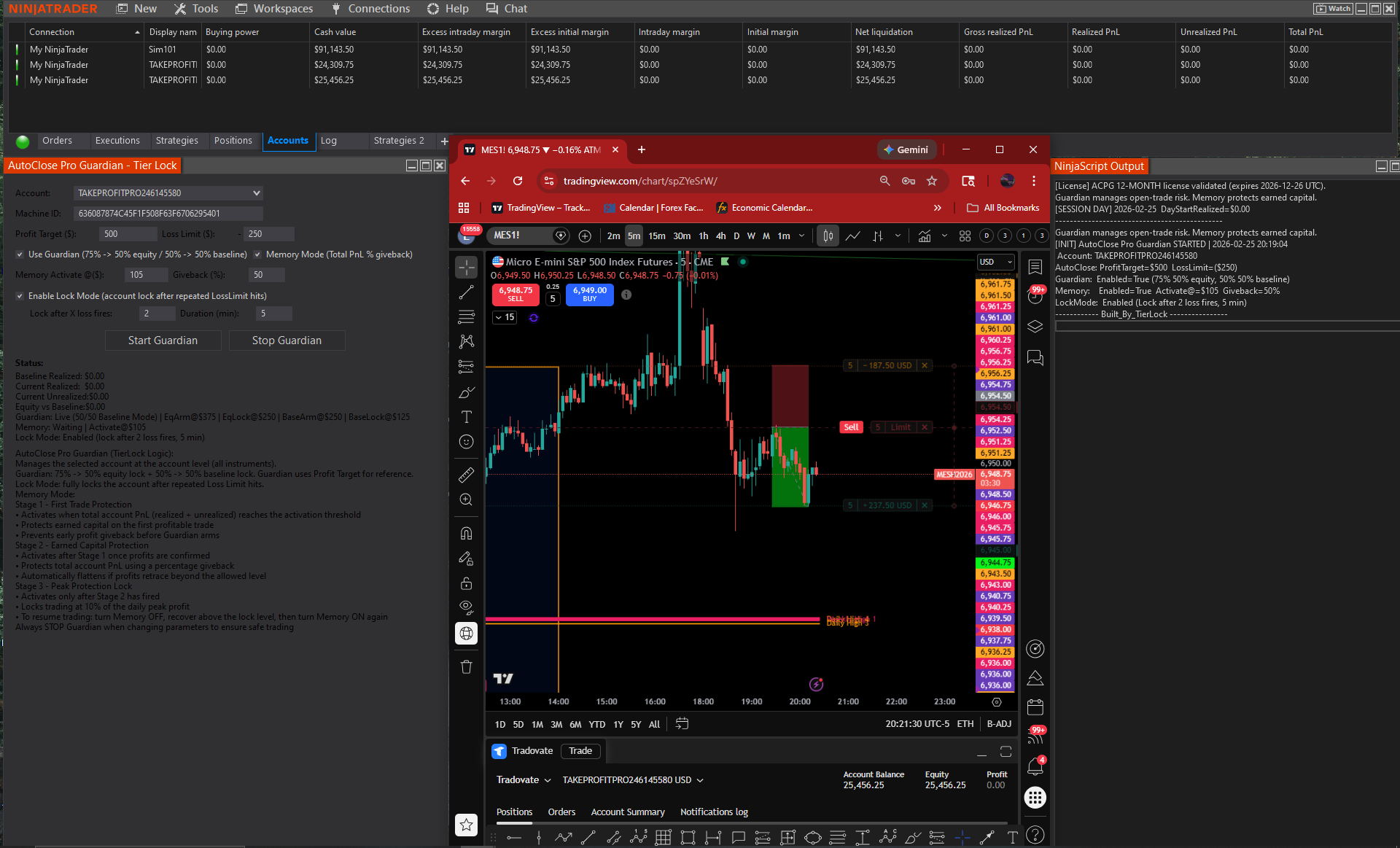
- Analyze structure in TradingView
- Execute orders in NinjaTrader
- Enforce risk automatically with AutoClose Pro Guardian or AutoClose Pro
Need NinjaTrader 8 for execution? Download NinjaTrader 8 from our ecosystem listing .
TradingView vs NinjaTrader vs Using Both Together
Many futures traders either over-focus on analysis or over-focus on execution. The best workflow separates them: structure on TradingView, execution on NinjaTrader, then risk enforcement through TierLock.
TradingView Only
- Excellent multi-timeframe analysis
- Clear levels and structure mapping
- Can encourage “analysis loops” without execution rules
- No account-level risk management enforcement
NinjaTrader Only
- Strong order routing and execution
- Fast position management and order controls
- Still vulnerable to overtrading without automation
- Trade-level stops ≠ daily loss limits at the account level
Both Together (Best Practice)
- TradingView defines structure + bias
- NinjaTrader executes with precision
- TierLock enforces mechanical enforcement
- Protects equity curve and psychological capital
TierLock separates structure, execution, and enforcement. Structure and key levels are defined on TradingView. Execution may occur within TradingView’s chart architecture or inside NinjaTrader, while AutoClose Pro Guardian (ACPG) or AutoClose Pro (ACP) enforces precision exit management and account-level risk control within NinjaTrader. Discipline after entry is not discretionary — it is mechanically enforced to protect capital and maintain structured trading consistency. — using AutoClose Pro Guardian and AutoClose Pro to enforce daily loss limits, session lockout, and profit locking.
Full Workflow Demonstration
ACPG DEMO
AutoClose Pro (ACP) Demo
ACP Risk Enforcement Demo
Continue Learning
- Account-Level Risk Management in NinjaTrader 8
- NinjaTrader 8 Daily Loss Limit Guide
- How to Stop Overtrading in NinjaTrader 8
- How to Lock Profits Automatically in NinjaTrader 8
- Manual vs Automated Risk Enforcement
- TradingView + NinjaTrader Workflow
- AutoClose Pro (ACP)
- AutoClose Pro Guardian (ACPG)
- Knowledge Base
- Glossary
Upgrade Your Trading Workflow
Use professional charting + mechanical risk enforcement together.
Start Using TradingViewNew users may receive promotional pricing when registering through our partner link.
Use professional charting combined with structured risk automation. Then explore our Knowledge Base to strengthen your futures trading discipline.